


VeSync
4.46.26K Reviews
App Specs
- Version
- 5.9.50
- Updated On
- License
- Free
- Downloads
- 5,000,000+
- Developer
- Vesync
- Categories
- Lifestyle
- Platform
- Android, iOS
Screenshots
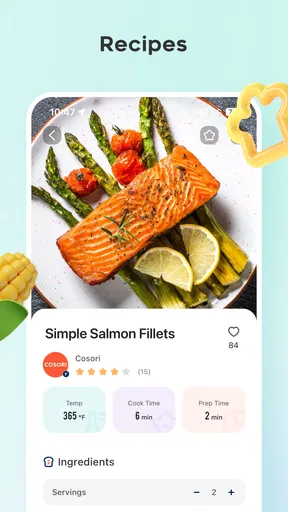
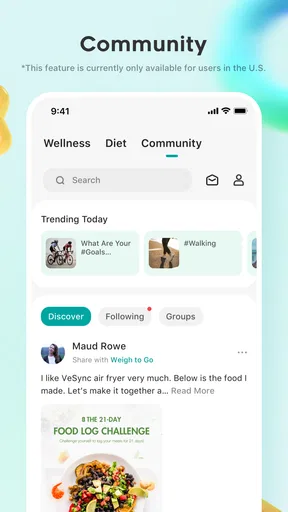
 Analysis by AppCompare
When I decide whether a smart-home app is worth keeping, I start with a practical question: will it make the devices I already own easier to use, or will it add another place I have to check? VeSync is most useful when several compatible appliances belong to the same household routine. It is a free lifestyle app from Vesync, and its appeal is less about replacing every control method than bringing supported devices into one phone-based setup.
That distinction matters before you download it. A central dashboard can reduce app-hopping, but it does not make unrelated products compatible by itself. I’d first check whether the devices you plan to use are supported, then consider which tasks you actually want to manage from your phone. If your main goal is simply to switch one appliance on occasionally, its own controls may already be enough.
Start with the devices, not the dashboard
The app is aimed at people who want to manage connected home products through a shared interface. Its catalog is associated with brands including Etekcity, Cosori, and Levoit, which gives it a more focused role than a universal smart-home controller that tries to cover every manufacturer. That focus can be an advantage if your home already uses compatible products, but it also makes checking fit the first decision rather than an afterthought.
A useful way to judge the setup is to list the actions you want to do repeatedly: check an appliance, change a setting, or arrange a routine around a time of day. If those actions involve devices VeSync supports, one app may be more convenient than separate brand apps. If your household’s equipment comes from a broad mix of unrelated brands, a platform with wider cross-brand coverage may suit you better.
The app has an average rating of 4.5 from around 37,000 ratings, with about 6,100 written reviews, and has been installed over a million times. Those figures suggest it has found a substantial audience, but they do not answer the most important personal question: whether it works with the specific products you own. I’d treat compatibility as the deciding factor, not popularity alone.
Streamlining Your Smart Home
First off, let's talk about what VeSync actually does. Imagine having the ability to control your smart bulbs, switches, air purifiers, and more—all from a single app on your phone. Sounds dreamy, right? It's like having a universal remote for your entire home, minus the hassle of multiple apps cluttering your phone. I gave it a whirl, and here’s what I found.
Setting Up
Getting started with VeSync is pretty straightforward. Once you download the app, it takes you through a simple registration process. After that, you can start adding your devices. The app supports a variety of products, primarily from Etekcity, Cosori, and Levoit. If you own any devices from these brands, you're in luck because the integration is seamless.
Worth Reading Before You Choose

EA SPORTS FC Mobile 26 Is a Bigger Football Game, but It Takes Time

Flipboard Shows What News Apps Must Do Beyond the Feed

Switching to Android Auto Means Rethinking Your Driving Routine

Google Calendar Makes a Crowded Week Easier to Manage

Ludo King Makes the Most of the Minutes Between Plans

Baby Panda World Brings Quick Play to Modern Phones, but Its Game Library Feels Busy
Adding a device is as easy as pie. The app guides you through each step with clear instructions, and before you know it, your devices are connected and ready to go. It's like putting together a puzzle where all the pieces just fit.
User Interface & Experience
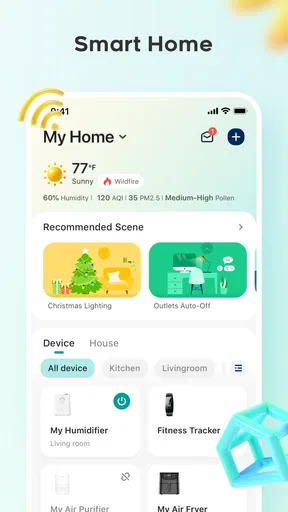
The user interface is sleek and intuitive. You don't need to be a tech genius to navigate through it. Everything is laid out clearly, making it easy to find what you're looking for. The dashboard gives you a quick glance at all your connected devices, and from there, you can control each one with just a few taps.
One of the standout features is the ability to create scenes and schedules. Want your lights to dim in the evening or your air purifier to kick on before you get home? No problem. The automation features are robust, allowing you to customize your environment to fit your lifestyle. It's like having a personal assistant who knows exactly how you like things.
For me, the practical benefit of a schedule is that it can take a small, repetitive decision off your plate. A weekday routine might involve setting a compatible device to run at a regular time, while a scene can group a few preferred actions into a single choice. I’d keep these routines simple at first: make one, live with it for a few days, then adjust it if it clashes with how the household actually works. Automation is only helpful when it matches real habits.
There is also a useful trade-off between convenience and flexibility. A routine built around one brand’s devices can be easy to understand, but it may not coordinate every product in a mixed-brand home. Before relying on a scene for something important, I’d test it while at home and confirm each connected device responds as expected. That small check is more reassuring than assuming a saved setting will always behave exactly as intended.
Performance & Connectivity
Performance-wise, the app is a champ. Devices respond quickly to commands, and the app rarely lags. It’s smooth sailing for the most part. Connectivity is also reliable. The app uses Wi-Fi to connect with your devices, and as long as your network is stable, you shouldn’t face any issues.
However, it's worth noting that if your Wi-Fi goes down, so does your control over the devices. So, make sure you have a solid internet connection to make the most of what VeSync offers.
That dependence changes how I’d use it during an ordinary day. If I’m leaving home and want a connected appliance to follow a routine, I’d set that routine in advance rather than rely on remembering to send a last-minute command. At home, I’d also keep the device’s physical controls in mind as a fallback where they are available. The phone app is convenient, but it should not be the only way you know how to operate an appliance.
A realistic example is coming home after a long day and wanting the room ready without opening several separate apps. If the relevant supported devices are already connected, a saved scene or schedule can reduce the number of taps. But if the network is having trouble, the same convenience can disappear at the exact moment you want it. I see that as a reason to use automation for routine comfort, not as a guarantee that every task can be handled remotely in every circumstance.
Choosing between a focused app and broader alternatives
Compared with the individual apps that usually accompany connected appliances, VeSync’s strongest case is consolidation: compatible products from its supported ecosystem can be managed from one place instead of scattered across separate brand interfaces. That is a meaningful win for a household with several matching devices. If you only own one, the difference may be modest, and the manufacturer’s own app or the device’s physical controls could be all you need.
The alternative is a broader smart-home platform, which may be a better fit when your priority is coordinating equipment from many manufacturers. The trade-off is that broader coverage does not automatically mean a simpler setup for every product. I would compare the actual devices and actions you care about, rather than choose based on the word “universal.” For a mainly Etekcity, Cosori, or Levoit setup, VeSync’s focused approach may feel more direct; for a home assembled from unrelated brands, breadth may matter more.
It is also worth separating “one app” from “one complete system.” A shared dashboard can make everyday control tidier, but it cannot remove every brand boundary or network dependency. I would not switch a working setup solely to make the home screen look neater. The change is worthwhile when it shortens a task you perform often, such as checking or adjusting several compatible devices as part of the same routine.
Security & Privacy
In today’s world, security is paramount, and VeSync takes this seriously. The app uses encryption to protect your data, and you have the option to enable two-factor authentication for an added layer of security. It’s reassuring to know that your smart home isn’t just smart, but also safe.
For a sensible setup, I’d use a strong account password and turn on two-factor authentication if it is offered for the account. I’d also think about who in the household needs access before sharing login details. These are small steps, but they help keep control of connected devices tied to the people who should have it. A smart-home app is part of the household’s account security, not just a remote control.
Who should make the switch
I’d recommend trying VeSync if you already own compatible products from its supported brands and want a single place for regular controls, scenes, or schedules. It is also a reasonable starting point for someone who is building around those devices and is comfortable using a phone and Wi-Fi as part of the experience. The app is free, rated for Everyone, and its current version is 5.8.70, so the entry cost is low; the more important investment is whether its ecosystem fits the home you are building.
I’d be more cautious if you rely on a patchwork of devices from many manufacturers, dislike managing accounts, or want essential appliance control to work independently of a network. In those cases, a broader platform, separate manufacturer apps, or straightforward manual controls may be a better match. There is no benefit in adding a hub to your routine if you still have to open multiple apps for the tasks you care about most.
Switching is not just a matter of installing an app. You may need to add devices again, recreate routines, and spend a little time learning where familiar controls now live. I’d make the change gradually: connect one device, verify that its normal controls work, and then bring over the next one. That approach makes it easier to spot a compatibility or setup issue before you depend on the new arrangement for the whole household.
Final Thoughts
All in all, VeSync lives up to its promise of simplifying smart home management. It’s user-friendly, efficient, and offers a level of control that’s both impressive and convenient. If you’re already invested in the ecosystem of supported devices, it’s a no-brainer. Even if you’re just starting to dip your toes into smart home technology, VeSync is a solid choice to consider.
So, if you're ready to bring order to your smart home chaos, give VeSync a try. It might just be the app that turns your house into the smart home of your dreams.
My practical recommendation is to begin with one device you use often, then decide whether the dashboard and routines genuinely save effort before adding more. If they do, the app has a clear role in your home; if they do not, there is little reason to force a new system into your day. For the right compatible setup, VeSync is a useful convenience layer. For everyone else, choosing devices and controls that already suit their habits is the smarter move.
Pros
- User-friendly interface for easy navigation.
- Seamless integration with smart home devices.
- Customizable scheduling options available.
- Real-time energy consumption tracking.
- Reliable app updates and support.
Cons
- Limited compatibility with older devices.
- Some features require a premium subscription.
- Occasional connectivity issues reported.
- App notifications can be overwhelming.
- Initial setup may be confusing for beginners.
FAQs for VeSync
What is VeSync, and how does it work?
VeSync is a smart home application that allows users to control and manage their smart devices from anywhere. It integrates with various smart home products, enabling users to set schedules, monitor energy usage, and receive notifications. The app is compatible with both Android and iOS, providing a seamless user experience across platforms.
Is VeSync compatible with all smart devices?
VeSync supports a wide range of smart devices, primarily focusing on products from brands like Etekcity, Levoit, and Cosori. However, compatibility may vary depending on the device model and features. It’s advisable to check the specific product details or the VeSync website to confirm compatibility with your devices.
How secure is the VeSync app?
VeSync prioritizes user security by implementing robust encryption protocols to protect data transmission between devices and the app. Regular updates are provided to address security vulnerabilities. Users are encouraged to keep their app updated and use strong passwords to enhance security further.
Can I use VeSync with voice assistants like Alexa or Google Assistant?
Yes, VeSync is compatible with popular voice assistants such as Amazon Alexa and Google Assistant. This integration allows users to control their smart devices using voice commands, offering hands-free convenience and enhancing the overall smart home experience.
Does VeSync offer customer support in case of issues?
VeSync provides comprehensive customer support through various channels, including email and live chat. The app also features an extensive help section with FAQs and troubleshooting guides. Users can access these resources for assistance with setup, connectivity issues, or general inquiries.


